Your committee makes the decisions.SmartCurlUI brings the assessments and team-building tools together.
Inside SmartCurlUI
See your club more clearly.
Explore a few views from the club analytics workspace.
1 / 5
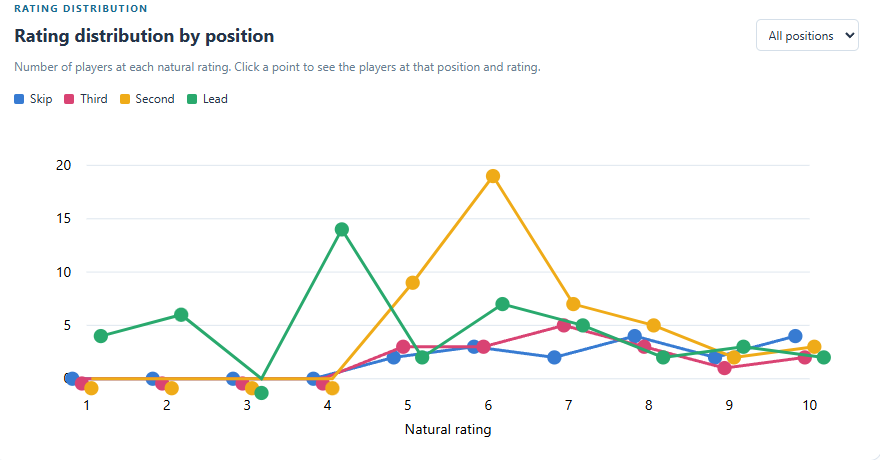
Rating distributionSee how player ratings are distributed within each natural position.
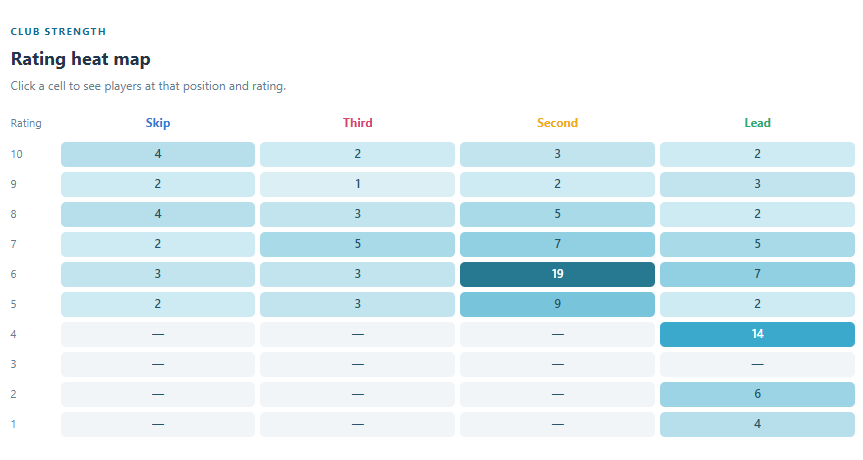
Rating heat mapCompare the number of players at each rating across the four positions.
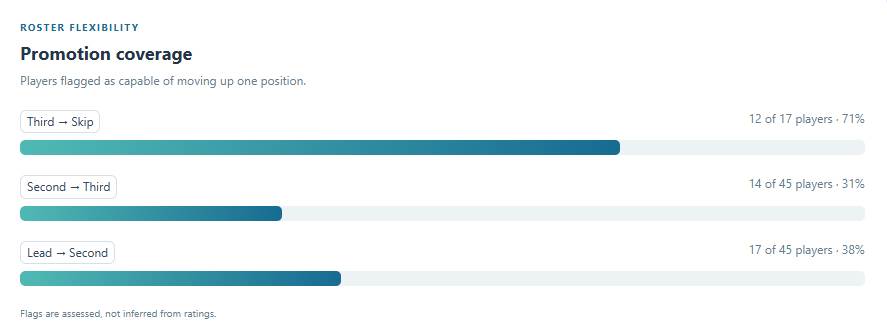
Promotion coverageUnderstand how many players are flagged as capable of moving up one position.
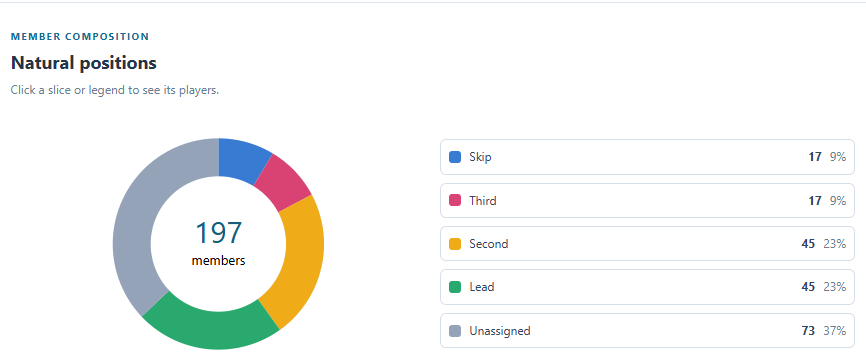
Natural positionsExplore the composition of the club by natural playing position.
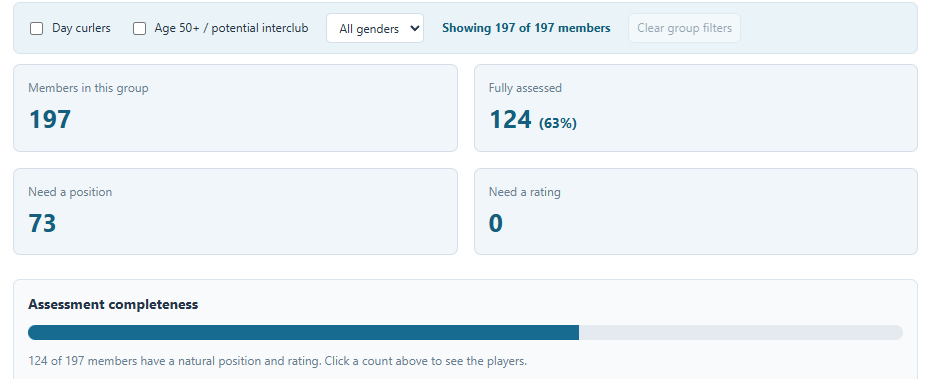
Assessment completenessSee how much of the roster has a complete position and rating.
App screenshots from the Lachine club pilot. Chart selections and filters work inside the signed-in application.
One connected workflow
From individual opinions to a shared club picture.
Start with what your members know, give the chair a clear view of the recommendations, and put the approved ratings to work.
01 / EVALUATE
Independent assessments
Evaluators recommend a natural position and a rating for the players they know. A blind first pass keeps official ratings and other assessments out of view.
Personal drafts that save automatically
Optional notes for the chair
Chair review and final approval
02 / UNDERSTAND
Useful club analytics
Explore the club’s strengths across positions and rating levels. Select a chart point to see the players behind it.
Ratings compared within each position
Day curler, age 50+ and gender filters
Read-only access for eligible evaluators
03 / BUILD
Balanced curling teams
Use approved ratings to generate teams for four-player or triples leagues and events, then review and refine the result.
Position and rating adjustments
Keep players together or apart
Save teams and export to PDF
People first. Tools second.
A process your committee can follow.
No app download. Sign in with your invited Google account and use the instructions built into the application.
01
The chair opens a round.
Choose the evaluators and the player list for the review.
02
Members assess players they know.
Choose a position, rate within that position, and submit when ready. Unfamiliar players can stay unassigned.
03
The committee reviews. The chair publishes.
Compare submitted recommendations and approve the final club ratings.
Before you sign in
A few things to know.
SmartCurlUI is in its club pilot phase. We’re refining it with feedback from real evaluations and team-building exercises.
Can anyone create an account?
Access is currently by invitation. You need a Google account using the email address approved by your committee chair. Interested clubs can contact us about future availability.
Do evaluators have to rate every player?
No. Assess only the players you know well enough to evaluate. Leaving unfamiliar players unassigned is part of the process.
Who decides the official ratings?
The ratings chair approves and publishes the final positions, ratings and flags after reviewing submitted assessments. Individual evaluations do not automatically change official club ratings.
Can I use it on an iPad or laptop?
Yes. SmartCurlUI runs in your browser. Landscape orientation gives you more room on an iPad. You need an internet connection to sign in and save your work.
Is this a replacement for our club website?
SmartCurlUI focuses on player evaluations, ratings, analytics and team generation. Your existing club website can continue handling membership, registration and other club activities.
Interested in SmartCurlUI?
Have a question, feedback, or a club that could use these tools? Tell us a little about what you need.
 SmartCurlUI